
A Star object can be created by using the Star tool in the toolbar.
Create
- Move the mouse pointer towards toolbar and click on button titled “Shapes”
- Next, from the shapes drop-down menu click on the item titled “Star”.
- A new Star object will be visible in the view.
Edit
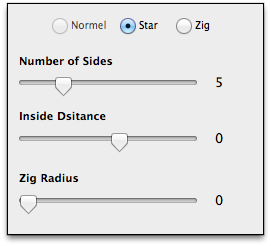
To edit a Star object use the Star Options to adjust the number of sides, Inside distance and the Zag radius.
- Select a Star object in the view.
- In Options panel click on the “Star Options” text button/link.
Updated for Version 1.2